
SHORT ANSWER
Cross-time-zone publishing starts with the content format, planning mode, target account, and account time zone. Smart BIAI supports batch video and image-post publishing, intelligent and filename-matching modes, account-local scheduling with automatic daylight-saving-time handling, plan previews, and task status records across TikTok, YouTube, Instagram, and Facebook.
Put content, accounts, and time in the same plan
When a team operates social accounts across markets, each publishing plan should answer five questions: what will be published, which account will publish it, which market it serves, which time zone controls the schedule, and what state the task is in.
Writing only “8:00 p.m. Beijing time” makes regional review difficult. Writing only “8:00 p.m. local time” leaves the execution system without a common reference. A more useful approach is to schedule in the account's local time, let the system calculate the execution time, and keep the content version, target account, required platform fields, and task state in the same plan.
Smart BIAI supports several planning modes for videos and image posts. Teams can preview the generated plans, apply shared settings in batches, adjust individual plans, and schedule by account-local time with automatic daylight-saving-time handling.
1. What an executable publishing plan should contain
A useful plan should make the relationship between the content, account, market, and time unambiguous. Include:
- Content and version: video or image-post identifier, language, aspect ratio, and copy version;
- Platform and account: the TikTok, YouTube, Instagram, or Facebook destination and the publishing account;
- Market and language: the country, region, and primary audience language;
- Account time zone and local time: the reference used by regional operators;
- System execution time: the Beijing time calculated by the system;
- Platform fields: copy, visibility, AI disclosure, and other destination-specific fields;
- State and result: pending, publishing, completed, or failed.
The goal is not to collect as many fields as possible. Every plan should simply show who publishes what, where it goes, when it runs, and what happened.
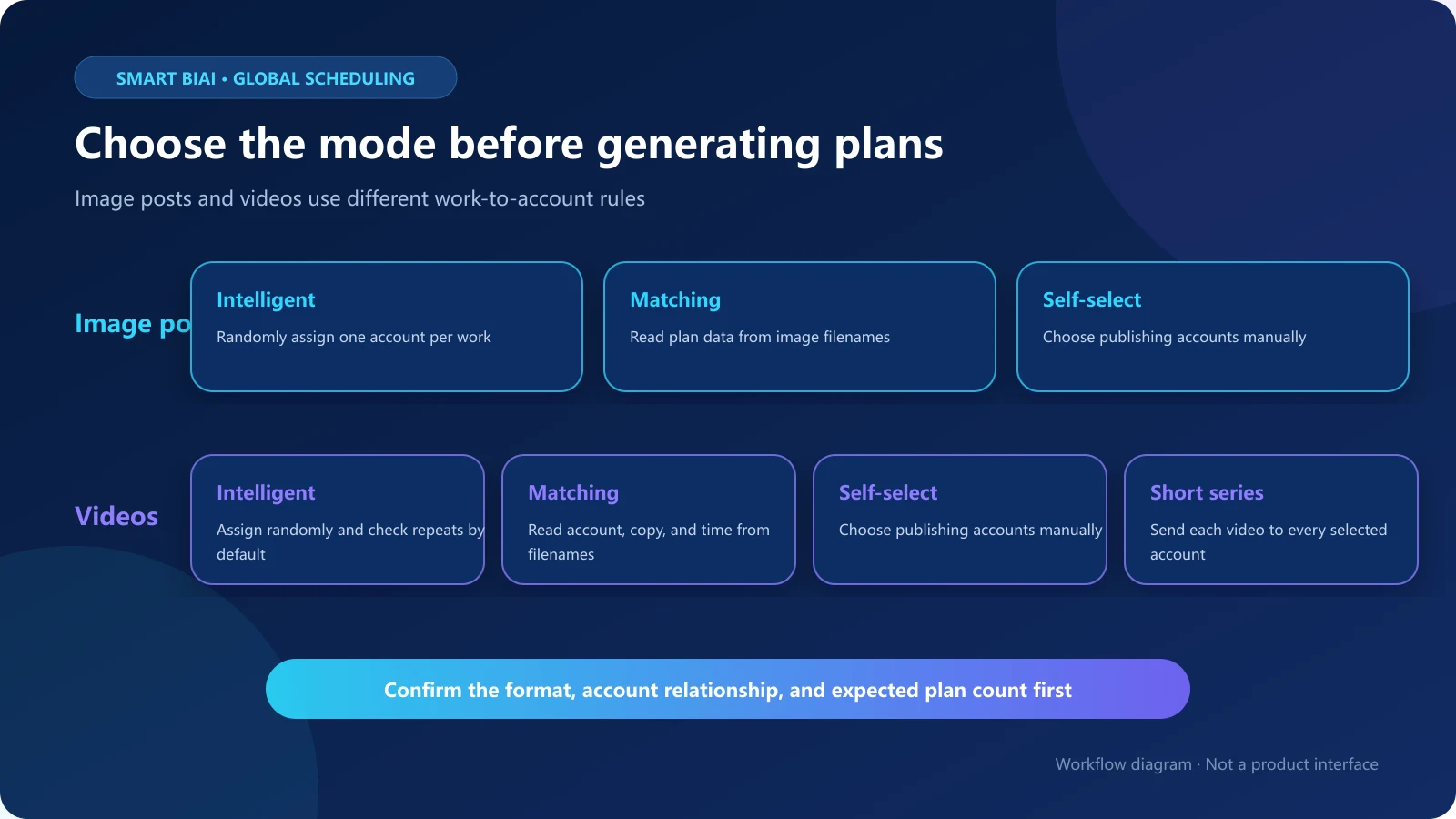
2. Three planning modes for image posts
Image-post publishing offers three ways to build plans:
- Intelligent mode: randomly assigns one publishing account to each work;
- Matching mode: reads the image filenames to identify the cover, account, title, copy, and publishing time;
- Self-select mode: lets an operator assign the publishing account manually.
Intelligent and self-select modes also let teams choose whether images may be reused and how many images are included in each work. Every image post requires at least one image. Reuse and image count should reflect the destination platform, account positioning, and purpose of the content.
3. Four planning modes for video publishing
Video publishing includes intelligent, matching, and self-select modes, plus a short-series mode for episodes or coordinated multi-account distribution:
- Intelligent mode: randomly assigns one account to each work and checks by default whether that account has already published the same work;
- Matching mode: reads the video filename to identify the account, copy, and publishing time;
- Self-select mode: lets the operator assign the account manually;
- Short-series mode: sends every video to every selected account, so the number of works equals videos multiplied by accounts.
Short-series mode can read the default filename pattern “number_copy_description” and supports custom recognition formats. Check the selected account set and expected number of works before creating the plan, because this mode intentionally differs from the one-work-to-one-account logic of intelligent mode.
4. What happens when video and account counts differ
In intelligent video mode, each work is matched to one selected account, with a default check for content that the account has already published.
- When video and account counts are equal, each video is matched to one account;
- when there are more videos than accounts, an account may receive several plans, so its timing and intervals should be reviewed;
- when there are more accounts than videos, the system does not repeat a video merely to use every account;
- when a video does not meet the selected platform's specifications, the system displays a prompt so the media can be corrected first.
Deduplication reduces repeat assignment of an already-published work to the same account. It does not replace human judgment about whether the media, copy, and business purpose fit that account. Short-series mode intentionally distributes every video to all selected accounts and therefore follows a different rule.
5. Preview plans before applying batch or individual settings
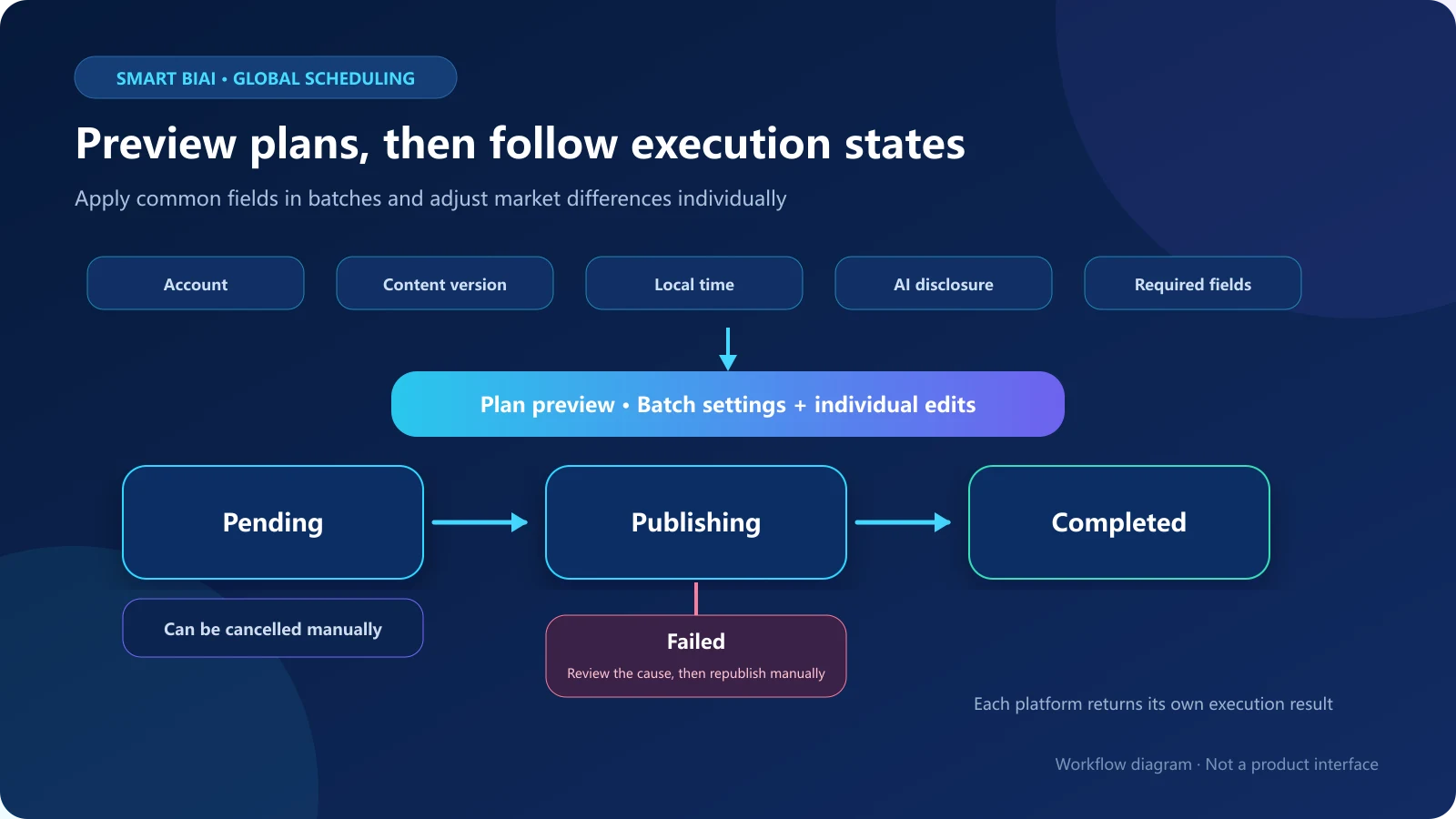
After plans are generated, preview them before submission. The preview can show the publishing account, media, copy, AI disclosure, visibility, immediate or scheduled publishing, comment settings, and other fields. The exact fields depend on the platform and content type.
Review the plans in this order:
- Confirm that the account's market, language, and business purpose match the content;
- check the video or image-post version, subtitles, and copy;
- complete required platform fields;
- confirm the AI disclosure according to the content and current platform requirements;
- check account-local time, calculated system time, and spacing between plans for the same account;
- verify that batch settings did not overwrite market- or language-specific content.
Batch settings are useful for common fields. Individual edits preserve differences between languages, accounts, and platforms. Combining the two is faster than editing every plan separately and safer than applying one configuration to every destination.
6. Schedule in account-local time and let the system calculate execution time
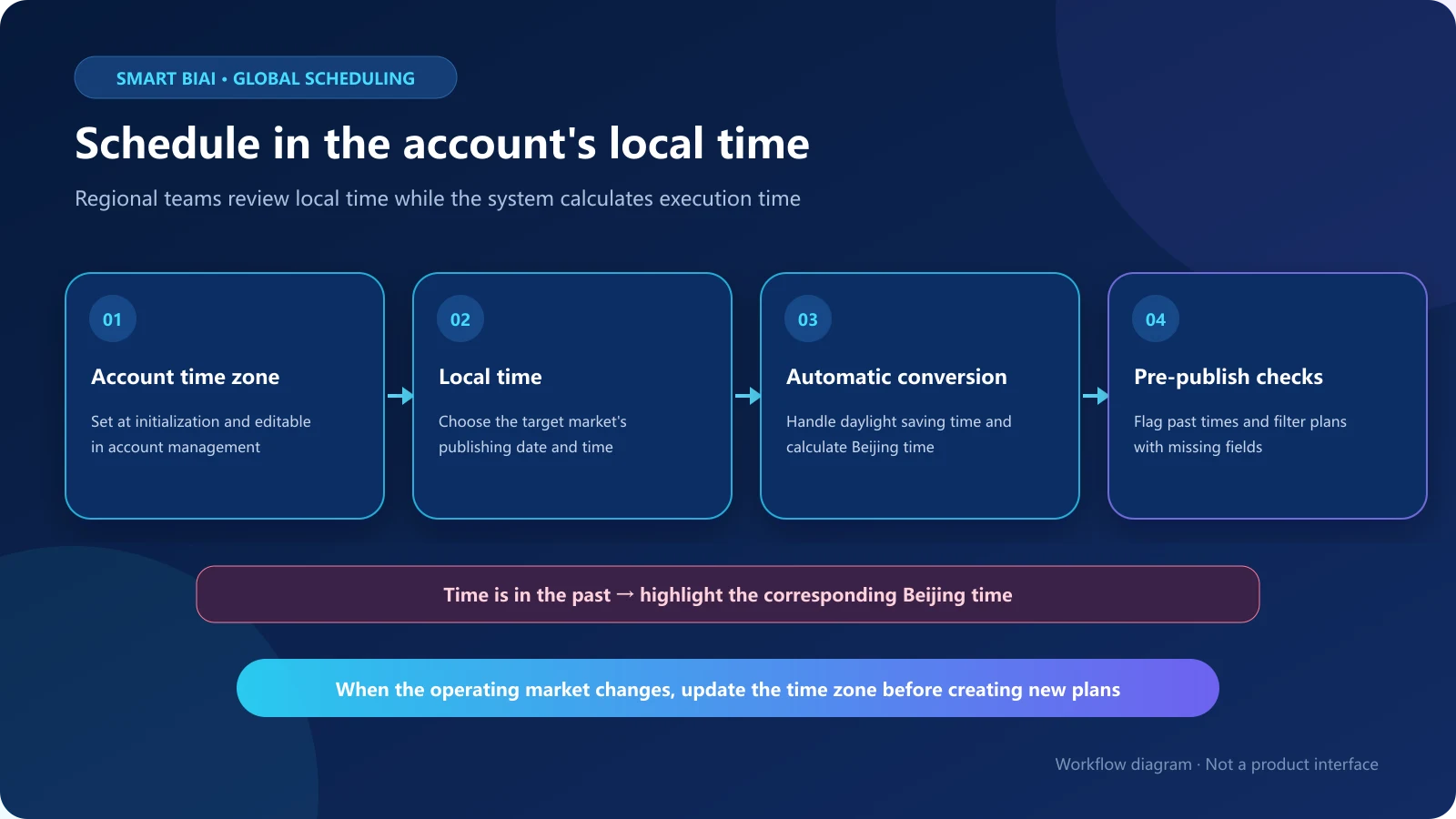
The account time zone is entered when the account is initialized and can be changed in account management. After an operator selects the desired local time, Smart BIAI calculates the corresponding Beijing time for execution and handles daylight saving time automatically.
If the calculated time is earlier than the current time, the interface highlights the corresponding Beijing time near the time selector. If a plan is missing required fields, a confirmation prompt appears and the incomplete plans are filtered for completion.
Accurate conversion depends on an accurate account time zone. Update the account before creating new plans whenever its market, operating region, or time zone changes.
7. Follow every plan from creation to completion
A publishing plan moves through pending, publishing, completed, or failed states. Pending plans can be cancelled manually. A failed plan can be published again after the operator checks account authorization, media specifications, required fields, and publishing time. Cancellation and republishing use the same permissions as publishing and do not require a separate permission setting.
Failure handling is a supporting part of the workflow, not the focus of routine scheduling. Task records and plan details remain available so operators can review work counts, account counts, and outcomes. In applicable official-API publishing scenarios, the publishing success rate can reach 99.9%. This is an attainable result under applicable conditions, not a fixed guarantee for every account, platform, or time period.
8. Supported platforms, formats, and required fields
Smart BIAI currently supports batch video publishing, smart publishing, and cross-platform publishing for TikTok, YouTube, Instagram, and Facebook. The same video can be scheduled for all four destinations in one workflow. TikTok, Instagram, and Facebook also support batch image-post publishing.
TikTok video and image-post workflows can use available music, hashtags, and location fields. Other available fields vary by platform and format.
A publishing account is required. Video publishing requires exactly one video per plan, while an image post requires at least one image. Other fields should reflect the operational need and the current requirements shown by the destination platform.
9. A practical cross-time-zone workflow
Use the following sequence for routine scheduling:
- Prepare the approved content version;
- choose the destination platform, format, and planning mode;
- select works and accounts, then generate plans using the relevant mode;
- preview the account, content, and platform settings;
- apply common fields in batches and adjust differences individually;
- choose publishing time in the account's local time;
- check the calculated execution time and required-field prompts;
- create the task and follow its state and plan details;
- use the record to prepare the next schedule.
For workflows shared by headquarters, regional teams, and agencies, content owners can confirm the media and copy, regional operators can confirm local timing and market fit, and publishing operators can check the account and platform fields. The system carries the configured plans and records; people retain the key business decisions.
10. How Smart BIAI supports batch publishing and scheduling
Smart BIAI generates video and image-post plans through intelligent, matching, and self-select modes, with short-series mode available for video. Teams preview the plans, apply batch or individual settings, and schedule according to the account time zone. The system calculates Beijing time, handles daylight saving time, and prompts for media-specification issues, past times, and missing required fields.
These capabilities reduce repeated data entry and omissions in multi-account scheduling. Platform rules, authorization, interface status, media specifications, and human configuration still affect execution. Confirm the account, content, time, AI disclosure, and platform fields before publishing.
Questions enterprise teams ask
Can accounts in different markets all be scheduled in local time?
Yes. Select the local publishing time based on each account's time zone, and the system calculates the Beijing execution time. Daylight saving time is handled automatically. Update the account time zone first when its operating region changes.
If there are more accounts than videos, will the same video be repeated automatically?
Not in intelligent video mode. The system does not repeat one video merely to use every selected account. Short-series mode is different: it intentionally distributes every video to all selected accounts.
What happens when there are more videos than accounts?
An account may receive more than one plan. Review the publishing time, content differences, and spacing for that account. Acceptable publishing frequency depends on the account and current platform rules.
How many images can an image post use?
Intelligent and self-select modes let teams configure the number of images per work and whether images may be reused. Every image post requires at least one image.
Can batch settings overwrite market-specific copy?
Batch settings apply common fields. When markets, languages, or accounts need different copy, review the generated plans and edit those fields individually.
Can a task be cancelled after it is created?
A pending plan can be cancelled manually. Once publishing has started, use the actions available for its current state and avoid creating a duplicate plan.
What should an operator do after a publishing failure?
Review the failure information, account authorization, media specifications, required fields, and publishing time. Correct the issue, then republish the affected plan without resubmitting completed plans.