
SHORT ANSWER
Global social media teams need clear boundaries for roles, features, accounts, content assets, and activity records. Headquarters can retain ownership and critical controls, regional teams can run local operations, and agencies or contractors can receive only the accounts, assets, and time-bound access required for their work.
What should a social media team's access model define?
When headquarters, regional teams, agencies, and contractors operate the same global social media portfolio, a simple “admin or member” distinction is rarely enough. The organization also needs to know which accounts and assets each person can see, what actions they can perform, and who takes over when a role or supplier changes.
Define the accounts and assets each person can access, the actions they can perform, the access period, and the accountable owner. Regional operators handle assigned markets, agencies work within contracted projects, and contractors receive the scope needed for their task.
| Question | What is configured | What determines the scope |
|---|---|---|
| Who can access which objects and perform which actions? | Enterprise members, roles, accounts, and assets | Responsibilities, assigned objects, and action permissions |
| What can the system do through a platform API? | A social account's authorization to an application | Available APIs, account type, and granted scopes |
| Who needs to work directly on a platform page? | Browser sessions and account environments | The operator's task and the platform's page requirements |
Enterprise access remains subject to the capabilities authorized by the social platform. See official APIs, browser login, and account isolation for connection options and limits.
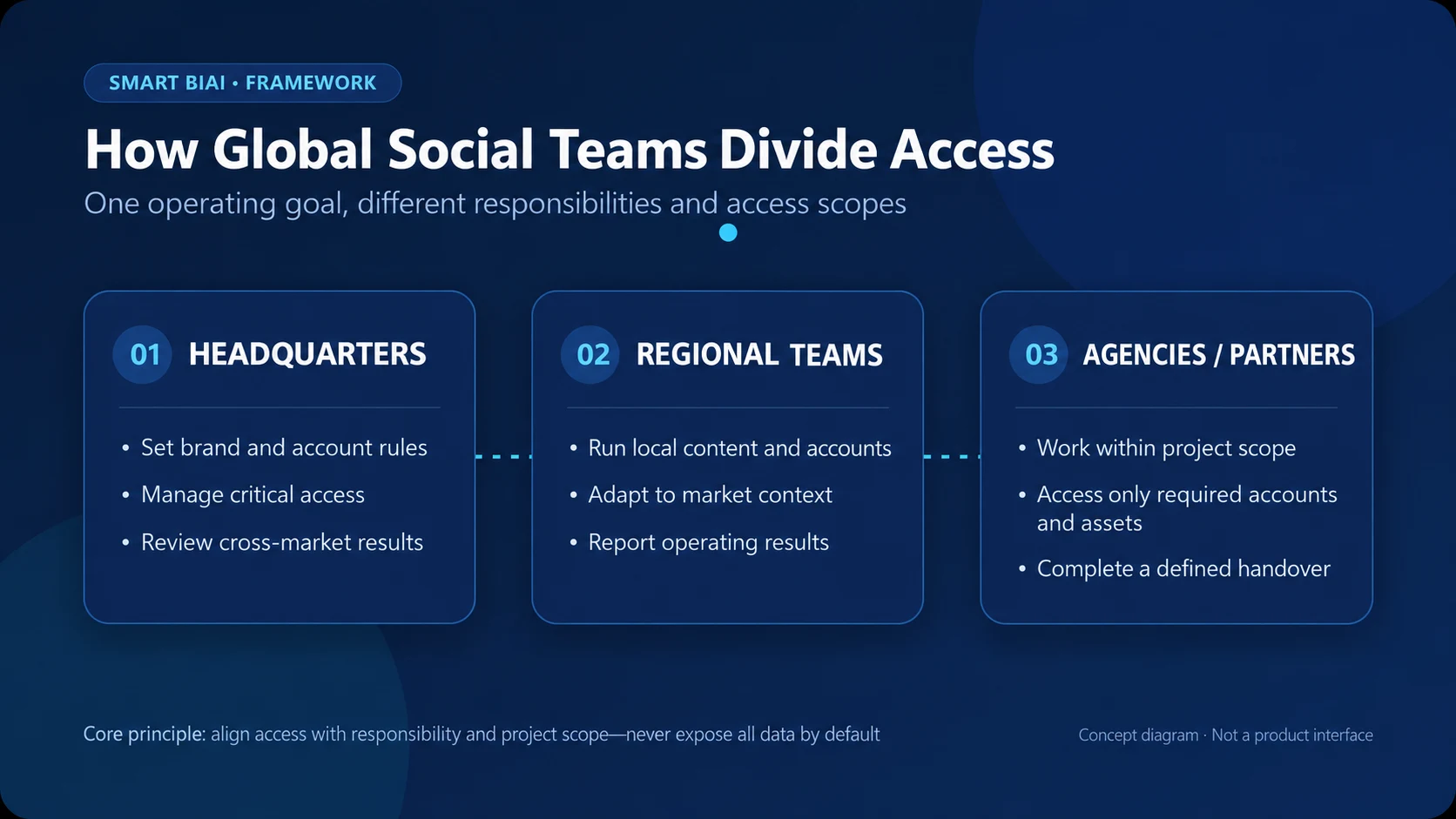
1. Define what each participant is responsible for
Before configuring permissions, list who owns the account, who executes the work, who confirms sensitive actions, and who needs the result.
Headquarters retains account ownership and recovery methods, sets brand and account rules, and controls organization settings, critical permissions, and major incidents.
Regional teams manage local accounts, languages, content plans, and publishing schedules within assigned brands and markets.
Agencies create, schedule, publish, or analyze content within the contracted project, market, account, asset, and data scope.
Contractors complete specific work such as editing, translation, or upload and normally need task-specific, time-limited access.
One person may perform several jobs, but system access should still reflect the work being done. A headquarters administrator account should not become a shared everyday login.
2. Separate visibility from operational permissions
Maintain a consistent account inventory with the platform, account identifier, brand, market, business purpose, owner, current operator, and connection status. This gives teams a reliable basis for assigning access.
Being able to see an account should not automatically grant every action. Common permissions can be divided into viewing accounts and data, creating or editing tasks, confirming publication, exporting data, connecting or disconnecting accounts, and managing members. Headquarters can retain portfolio visibility, regional teams can work within assigned markets, and agencies can enter only the agreed project scope.
TikTok, YouTube, Instagram, and Facebook differ in account types, interfaces, and authorization options. The final operating scope always depends on the platform, account permissions, region, and connection method.
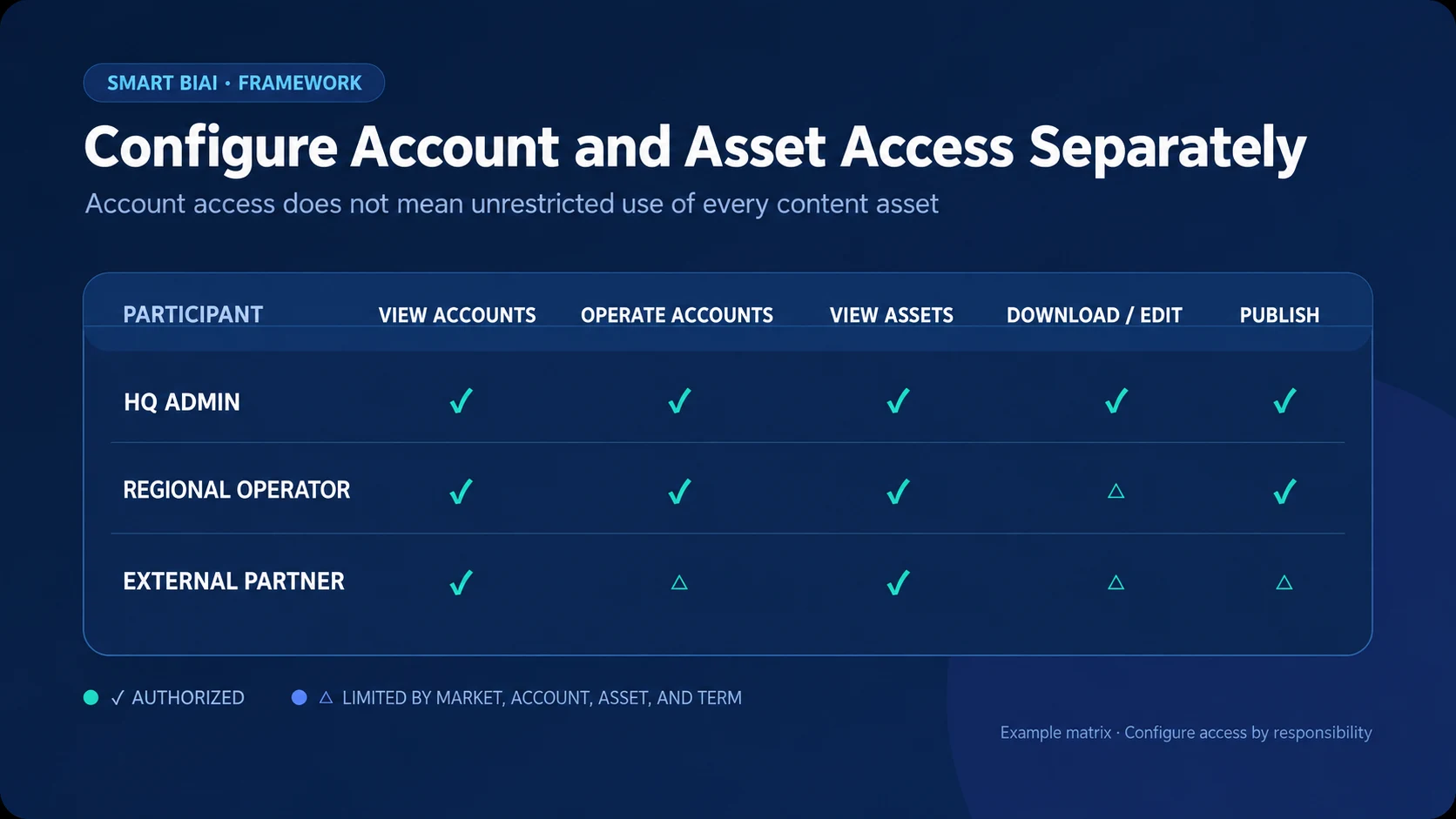
3. Manage account access and asset access separately
Permission to operate an account does not grant unrestricted use of every video, image, caption, or music track. An asset may be approved only for a particular market, platform, campaign, or period.
- Video: source footage, edited versions, people and voice rights, eligible platforms, and validity period.
- Image: source, product version, people or locations shown, editing rights, and eligible markets.
- Copy: language, product-information source, approved accounts, final version, and last update.
- Music: rights source, commercial-use scope, platform restrictions, territory, and term.
Headquarters can maintain core brand assets, regional teams can add localized versions, and agencies or contractors can access only the folders needed for the current assignment. View, download, edit, and publish rights can also be granted separately.
4. Make activity records answer useful questions
Activity records help with handovers, publishing incidents, and access disputes. At minimum, record account connections and disconnections, membership or permission changes, publishing tasks and results, content or data exports, and material changes to asset-use scope.
Each record should identify the actor, time, object, action, and result. Batch operations should also retain target accounts, content version, task volume, execution status, and any failure reason. Sensitive account information or personal data should remain visible only to people who need it.
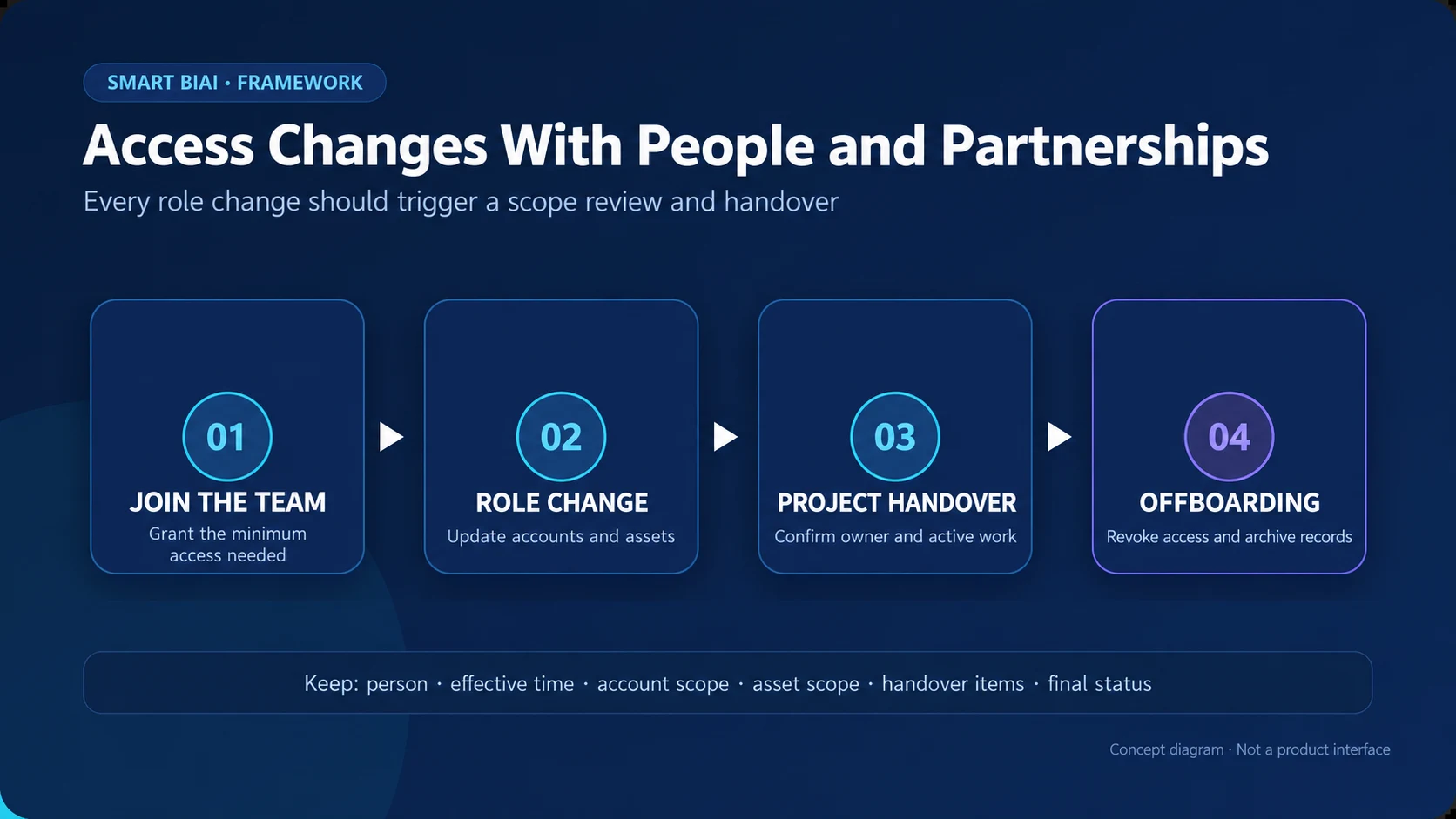
5. Handle joining, role changes, handovers, and offboarding
For a new member, confirm the organization, role, manager, work scope, target accounts, required features, available assets, and access period. Start with the minimum needed to complete the task.
When a role or project changes, remove obsolete account and feature access before adding the new scope, and record the reason and effective time. During a handover, transfer account ownership and recovery information, active tasks, assets, schedules, incidents, and pending work—not only chat history or a shared password.
When employment or a supplier relationship ends, revoke member access and unnecessary authorizations, review exported files and unfinished tasks, and assign the work to an authorized owner. Monthly or quarterly reviews can identify high-privilege roles, inactive accounts, expiring access, and former supplier members.
6. Test every permission with four questions
- Who can see? Which brands, markets, platforms, accounts, data, and assets are visible?
- Who can act? Which creation, editing, publishing, export, connection, or configuration actions are allowed?
- Who confirms? Who confirms external publishing, bulk exports, or membership changes, and who handles exceptions?
- Who takes over? Who receives the accounts, assets, tasks, and records when a person or supplier changes?
If any answer is unclear, avoid granting broad permanent access. Short projects are better served by a precise scope and end date.
7. How Smart BIAI supports team access management
Smart BIAI supports permissions by role, feature, account, and asset or data scope, with activity logs for relevant changes and task records. Headquarters, regional teams, and service providers can each receive access to their assigned brands, markets, accounts, and materials.
Start with one market and check whether viewing, editing, publishing, and exporting match each person's responsibilities. Use global social account naming, groups, and tags to organize accounts; names and tags do not replace access configuration.
The standard product does not include a complete enterprise approval workflow or SSO. Multi-level approval and enterprise identity integration can be assessed in an enterprise engagement.
8. Prepare seven items before configuration
Start with an account inventory, people and organization list, responsibility matrix, feature-permission list, asset categories and usage scope, required activity records, and onboarding/offboarding checklist.
The first version does not need to be complex. Make sure every account has an owner, sensitive actions have an accountable person, each asset category has a usable scope, and departures trigger a complete handover. Good access management helps the right people work efficiently within clear boundaries.
Questions enterprise teams ask
Should headquarters hold administrator access to every social account?
Headquarters should retain ownership, recovery methods, and accountability for critical permissions, but not every headquarters employee needs the highest privilege on every platform. Keep critical access with a small number of named owners and grant everyone else the scope required for their work.
Can regional teams add agency members themselves?
That depends on the operating model. If allowed, restrict the organizations, accounts, features, and access period they can assign, and record the change. If headquarters manages membership, regional teams should request access through the agreed process rather than share an administrator identity.
Should an agency see content and data from other markets?
Not by default. Agencies normally need only the brands, markets, accounts, assets, and metrics covered by the contract. Cross-market access should be added explicitly with an owner and end date.
Does account access include downloading every content asset?
No. Account operations and the ability to view, download, edit, or publish videos, images, copy, and music should be controlled separately and remain within the asset’s licensed scope.
Which activities should be recorded first?
Prioritize account authorization and disconnection, membership and permission changes, external publishing, batch tasks, content or data exports, and changes to critical asset scope.
What should happen first when an employee leaves or an agency contract ends?
Confirm account ownership and active work, revoke unnecessary access and authorizations, review exports, assets, schedules, and incidents, and assign an authorized person to take over.
Does Smart BIAI include a complete approval workflow and SSO?
The standard product provides role, feature, account, asset and data access controls plus activity logs. Complete multi-level approval and SSO are not standard features and can be evaluated for an enterprise implementation.