
SHORT ANSWER
Turn a social media review into next week’s content plan in five steps. Check the data, choose a focus, draft topics, schedule production and publishing, and preview the tasks. A six-post example across two markets shows how to connect ideas to assets, accounts, owners, local times, and follow-up results.

Article
Turn a social media review into a content calendar in five steps: check the data, choose a focus, draft topics, plan production and publishing, then preview and confirm the tasks. Each entry needs an account, asset version, market, language, owner, and follow-up plan. Smart BIAI Agent can assist with analysis and drafts; your team decides what to make based on the product, available materials, and this week’s workload.
1. What should you give the AI before planning?
Name the accounts and dates to review, then add product information, available materials, and the production schedule. These details help the AI suggest topics that answer customer questions and fit the team’s time.
| Input | What to specify | How it helps the plan |
|---|---|---|
| Accounts and data | Platform, selected accounts, markets, complete dates, metric definitions, and refresh time | Find the posts and changes worth reviewing |
| Posts and audience questions | Published links, openings, topics, specific comments, and sales questions | Decide what the next post should explain |
| Products and assets | Accurate product information, usable images and video, languages, and existing exports | Separate reusable material from new production |
| This week’s business priorities | Launches, campaigns, stock changes, destination pages, and contact routes | Make the topics relevant to current needs |
| People and time | Available production time, owners, budget, and completion dates | Choose a volume the team can deliver |
State what is missing. If you only have current lifetime views, do not ask the AI to reconstruct each post’s results at exactly 72 hours. Use the natural-language social data guide to define a query, and the cross-platform data guide to check metrics and refresh schedules.
2. How do the five steps work?
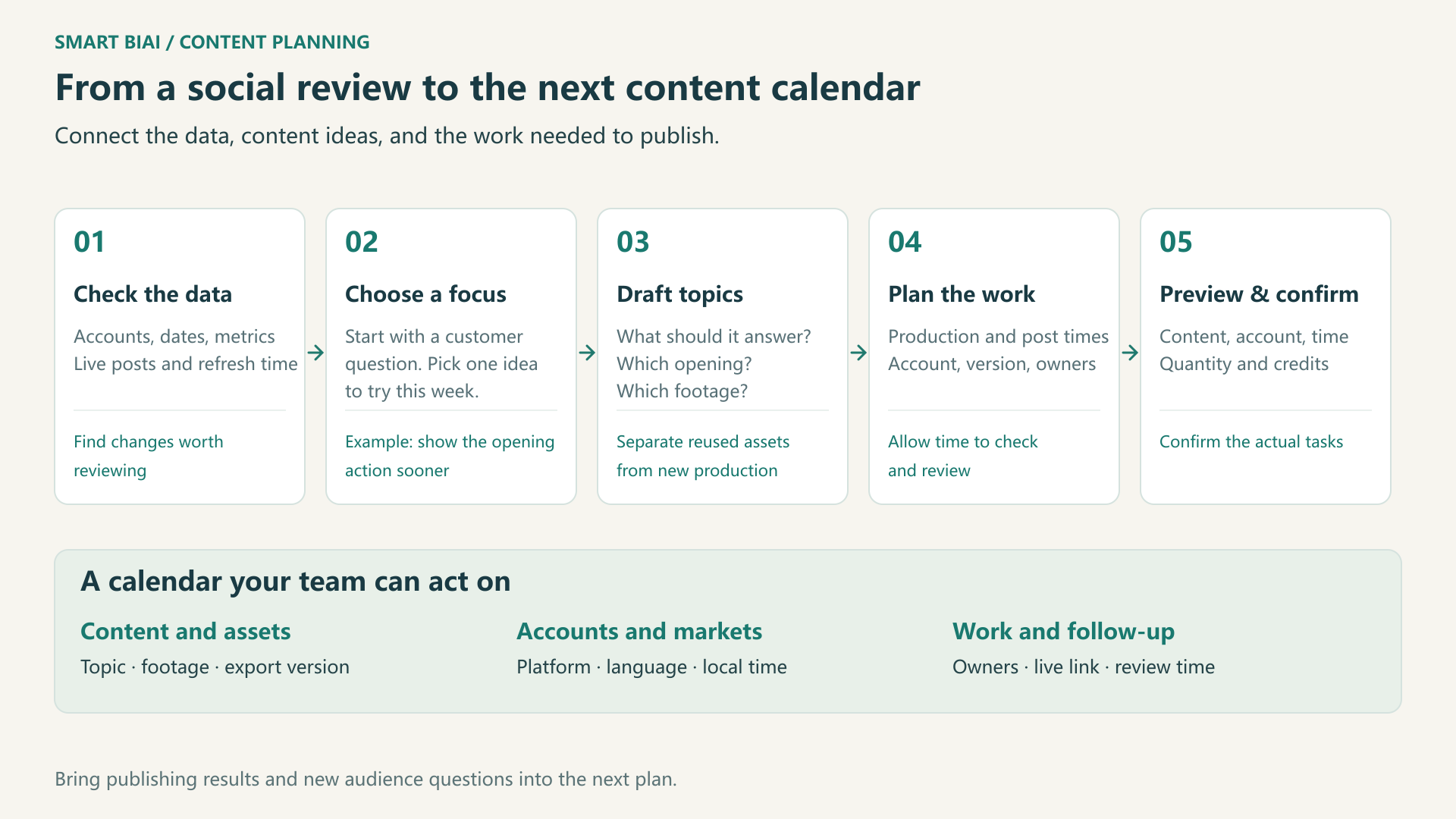
1. Check the data and identify posts to examine. Confirm that the intended versions are live and note when the data was refreshed. Compare posts of similar ages within the same platform and market. Watch the videos to identify topics, openings, or formats worth trying again.
2. Choose one focus worth trying this week. Lower views alone do not tell you to publish more. Make the proposed change specific, such as “show how the bottle opens earlier in the video.” Try it in a small batch, then check whether viewers understand the operation more easily.
3. Turn the focus into topics someone can produce. Write one audience question for each post, followed by an opening and the footage needed to answer it. An existing demonstration may need a different opening. A recurring cleaning question may require new close-ups based on the product instructions.
4. Schedule production, publishing, and follow-up separately. Match each entry to an account and market version. Allow time to collect materials, create the content, and check it before choosing a publishing time. Name the observation and follow-up date as well. Keep the production deadline separate from the post time.
5. Preview the actual tasks before confirming them. Before video generation or processing, check assets, versions, volume, and credit use. Before publishing, check the export, account, copy, platform settings, and time. Smart BIAI Agent can assist with topics, scripts, and task drafts. Once you choose the content, use the features enabled for your account to produce and publish it. See the human confirmation guide for the checks involved.
3. How could one product become six posts for next week?
Consider an illustrative commuter-bottle plan. Suppose recent questions concern opening and cleaning the bottle. The team plans three TikTok posts each for US-01 in US English and DE-01 in German. Two opening variants of a demonstration and one cleaning Q&A make three content ideas; two market versions of each produce six planned posts.
| Local day | Market and account | Topic | What to prepare | What to review |
|---|---|---|---|---|
| Monday | US · US-01 · English | Opening demonstration, showing the result first | Opening A, real operation close-ups, English captions | Questions about steps already demonstrated |
| Monday | Germany · DE-01 · German | Opening demonstration, showing the result first | German wording and the matching export | Whether local viewers understand the operation |
| Wednesday | US · US-01 · English | The same demonstration, starting with a use question | Opening B; keep the main demonstration similar | Views and questions compared with English opening A |
| Wednesday | Germany · DE-01 · German | The same demonstration, starting with a use question | German opening B and the same product details | Compare the openings within the German account |
| Friday | US · US-01 · English | Buying questions: opening details and cleaning | Product instructions and close-ups of relevant parts | New questions, website visits, and inquiries |
| Friday | Germany · DE-01 · German | Buying questions: opening details and cleaning | German instructions and a usable local contact route | Local questions and destination-page visits |
Adjust these six planned posts to your materials and capacity. Compare openings within each market before choosing the next batch. Audiences and timing vary between organic posts, so use this small set to find a direction and keep observing later posts.
A time such as “Monday at 18:30” also needs a timezone. On November 2, 2026, 18:30 in New York is November 3 at 07:30 in Beijing. On the same date, 18:30 in Berlin is November 3 at 01:30 in Beijing. These examples use America/New_York, Europe/Berlin, and Asia/Shanghai; convert other dates using their applicable timezones. The multi-market content calendar guide covers fields and date changes in more detail.
4. What makes a calendar entry ready for a colleague to use?
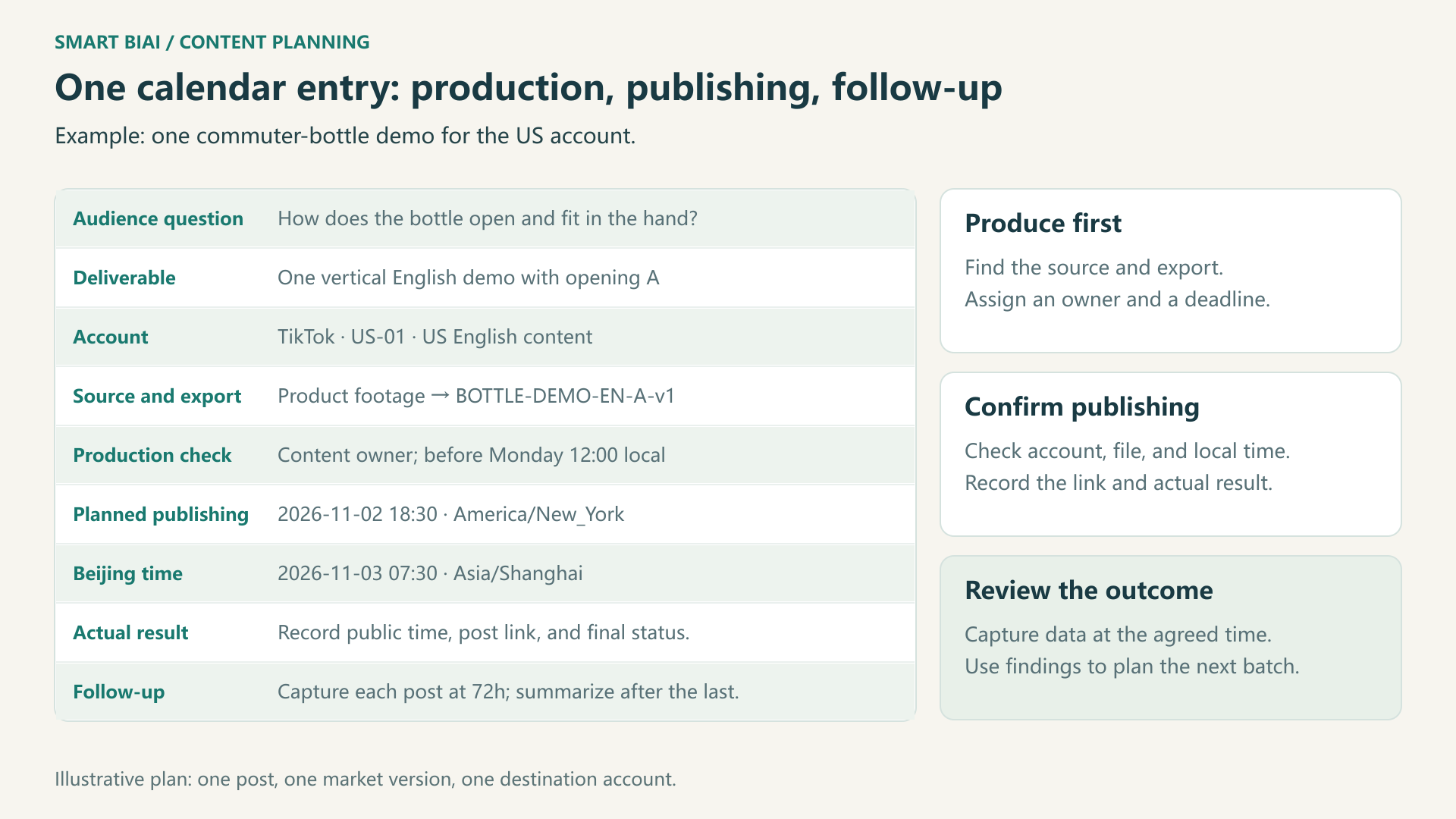
Expand a topic into a record that points to the right file, account, and time. The first US demonstration could use the following information.
| Field | Example |
|---|---|
| Audience question | How does this commuter bottle open, close, and fit in the hand? |
| Deliverable | One vertical English demonstration using opening A |
| Destination account | TikTok · US-01 · US English content |
| Source and export version | Original operation footage; BOTTLE-DEMO-EN-A-v1 |
| Production owner and deadline | Content owner; checked before Monday at 12:00 local time |
| Planned post time | 2026-11-02 18:30 · America/New_York |
| Beijing equivalent | 2026-11-03 07:30 · Asia/Shanghai |
| Actual publishing result | Record the public time, post link, and final status |
| Follow-up | Capture each post at 72 hours; summarize after the last post reaches that age |
Once the video is ready, the publishing owner selects the matching file, account, and settings. If materials or dates change, check both the calendar and any scheduled tasks so that the latest plan is used. Use the content library guide to organize versions and usage scope, and the batch publishing guide for previews and failures.
5. What should the team check in an AI-generated draft?
First check the product and business context. Are the claims accurate? Can the footage show the operation clearly? Are the campaign, stock information, and destination page still suitable? Check specific advice, such as cleaning methods, against the product instructions.
Then check materials and workload. Confirm that the required languages and formats exist and that music, people, and images can be used for these posts. Leave enough production time. If something is missing, make the next task a shoot or a sample before scheduling the finished post.
Finally review the task preview. Confirm the account, export, copy, time, platform settings, volume, and cost. Have a colleague who knows the product and market review the plan before production or publishing.
6. How do you decide what to continue or change?
Record live links and actual status before comparing performance. Check failed or unpublished posts first. Content that never went live does not demonstrate a lack of audience interest.
Choose two or three observations that match the goal: views, interactions, recurring product questions, or website visits and inquiries. Use platform or synced data for views and interactions. Check website analytics, tracked links, and lead records for visits and inquiries, retaining the source for each result.
| What you observe | A useful next step |
|---|---|
| One opening better supports the goal within the same market | Keep the approach and try a related question |
| Views increase but operation questions remain | Add a clearer close-up or explanation |
| Exposure is reasonable but visits or inquiries are limited | Check the call to action, link route, and destination page |
| Publishing is incomplete or data is missing or too recent | Resolve the status or wait before changing topics |
The 72-hour example requires records captured at that point. If only current lifetime totals are available, compare posts of similar ages and state the differences. A Sunday review may be too early for Friday’s posts. Mark those entries for follow-up and summarize once the last post meets the agreed condition.
Leave one specific change for the next round and connect it to a topic, an asset, or a task. The diagnostics-to-action guide explains how to examine a change before choosing an action.
Start with one market and a manageable batch
Choose a group of accounts you operate, one specific customer question, and a volume the team can finish in a week. Use Smart BIAI Agent to assist with data, topics, and drafts, then review the materials and task previews. To discuss your accounts, data, and production process, request a Smart BIAI Agent demonstration.
Questions enterprise teams ask
Can AI plan a calendar without historical social data?
Yes. Start with product information, audience needs, and common questions. Treat the initial topics as ideas to try, then use published records to inform later changes.
How does Smart BIAI Agent differ from asking a general AI for a calendar?
Smart BIAI Agent can use authorized company materials, account and post data, assets, and task records to assist with analysis and drafts. Check whether its suggestions relate to your posts, use available materials, and fit this week’s schedule.
Should a successful post be copied to every market?
First consider whether its performance relates to the local audience, language, campaign, or timing. Keep a useful approach, adapt a small set for another market, and review that market separately.
Can the team coordinate all markets in Beijing time?
Yes, while retaining each account’s timezone and local date and time. Check date changes and daylight saving before execution so regional colleagues and publishers understand the same arrangement.
Does every account need the same number of posts?
No. Use the account’s purpose, available materials, production time, and actual feedback to set volume. Start with work the team can sustain before expanding.
Does an AI-generated calendar automatically start production and publishing?
Choose the content you want to make from the draft. Confirm assets, volume, and credits before production, then check exports, accounts, copy, and times before publishing. Use the features enabled for your account to execute the tasks.
Must every review happen 72 hours after publishing?
No. Choose an observation age or complete period that fits the content. Fixed-age comparisons require records captured at that time; otherwise describe the conditions you can actually compare.
Should we publish more if the first round shows no clear improvement?
First check that tasks completed, the data is sufficient, and the intended change appears in the export. Narrow the batch, make a sample, or adjust one clear factor before reviewing the next results.