
SHORT ANSWER
Use one row for one version, account and planned publication. Connect media, local time, publishing fields, content confirmation and results. A six-task example across three markets explains daylight-saving changes, rescheduling, failures and weekly review.

Article
Use one row for one content version, one target account and one planned publication. Connect each row to its media, platform, market, language, local date and time zone, publishing fields, owner, content confirmation and execution result. Complete the preparation and publication of one post before adding more markets.
“Publish on Monday evening” means different things to colleagues in New York, Berlin and Singapore. A finished video also needs the right language, cover and caption for each account. A useful calendar lets everyone find the version, account and time for each publication, then locate the resulting post.
1. Which eight information groups should a social content calendar include?
Start with eight groups. Files, account details and results can stay in separate lists; use IDs or links to connect them rather than copying every detail into every row.
| Information group | What to record | What it answers |
|---|---|---|
| Task and topic | Task ID, campaign and the question this content answers | Why are we publishing this? |
| Asset and version | Source asset ID, final version and file link | Which exact file will be used? |
| Market and language | Target market, subtitle and caption language | Who should understand this post? |
| Platform and account | Platform, target account ID and readable name | Which account will publish it? |
| Date and time zone | Local date and time, time zone and converted execution time | When will it run, including date changes? |
| Publishing fields | Title, caption, cover and available disclosures or location | What does this platform still need? |
| Owner and content confirmation | Preparer, reviewer and whether revision is needed or scheduling can proceed | Who handles the next step? |
| Execution and results | Task state, attempts, actual time, post link and measurement window | Did it publish, and where is the result? |
After the content is confirmed, check the target account connection and arrange publication. Add the actual time and post link once it publishes so colleagues can distinguish ready content from published work.
2. How does one source asset connect to posts in several markets?
Reuse the source material, save the prepared publishing versions separately, and create a publication row for each account. A change to one market's caption or one platform's cover can then be applied to the affected task.
Consider the fictional brand NOVA and its commuter-backpack packing demonstration. One source asset, MAT-100, supplies six publishing versions for the United States, Germany and Singapore. Four accounts receive six planned posts: two on the US TikTok account, two on the Singapore YouTube channel, and one each on the German Instagram and Facebook accounts.
| Object | Example | How it connects |
|---|---|---|
| Source asset | MAT-100: commuter-backpack packing demo | Holds shared footage and product information |
| Publishing version | V-US-TT-01, V-DE-IG-01 and four others | Stores its language, edit, cover and caption |
| Target account | AC-US-TT, AC-DE-IG, AC-SG-YT, AC-DE-FB | Finds the corresponding platform account and profile |
| Publication row | CAL01 through CAL06 | Selects one version, account and time |
| Execution record | Task ID and each attempt, once execution starts | Retains the outcome, reason and public post address |
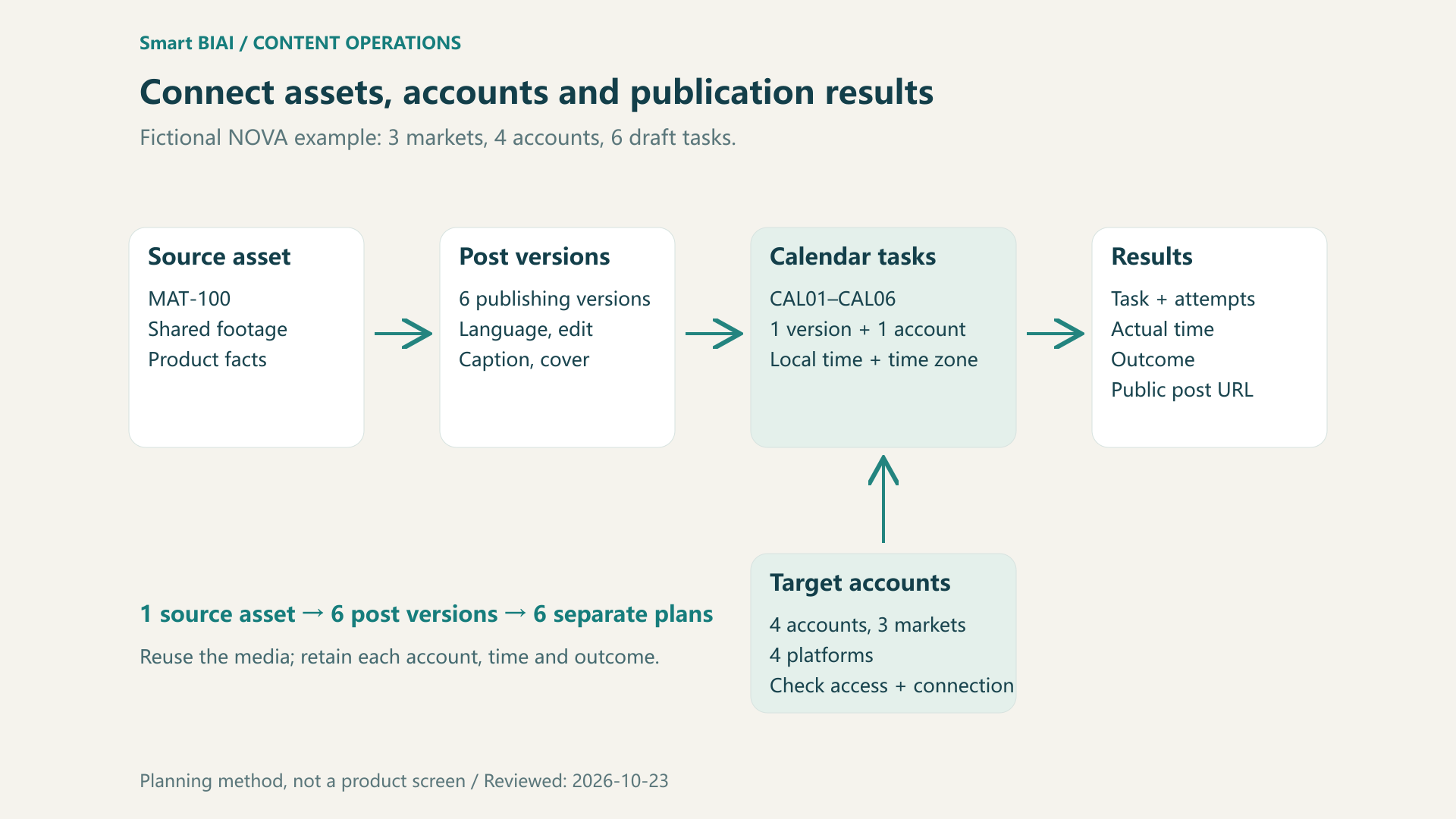
Figure 1. Several tasks can reuse an asset while retaining their own account, version, time and result.
Keep account IDs stable so older tasks remain findable after a display-name change. See global social account naming, groups and tags for an account register, and the enterprise social content library guide for media versions and usage information.
3. How do you preserve local publishing time across time zones?
Select the operating time zone for the account, save the local date and time together with that zone, and convert it to a shared execution time. A country name alone is insufficient: the United States has several time zones, and “6 p.m. local time” still needs a date and location.
Use identifiers such as America/New_York, Europe/Berlin and Asia/Singapore instead of assuming a fixed UTC offset throughout the year. The IANA Time Zone Database is updated when time-zone boundaries, UTC offsets or daylight-saving rules change. Keep the relevant software and time-zone data current.
The six fictional plans below illustrate time conversion. All dates are in 2026. Using 18:00 makes the conversions easy to compare; it is not a recommended best posting time.
| Task / publishing version | Market / platform / account | Local date and time | Time zone | UTC execution time | Beijing time |
|---|---|---|---|---|---|
| CAL01 / V-US-TT-01 | US / TikTok / AC-US-TT | 10-26 18:00 | America/New_York | 10-26 22:00 | 10-27 06:00 |
| CAL02 / V-DE-IG-01 | Germany / Instagram / AC-DE-IG | 10-26 18:00 | Europe/Berlin | 10-26 17:00 | 10-27 01:00 |
| CAL03 / V-SG-YT-01 | Singapore / YouTube / AC-SG-YT | 10-26 18:00 | Asia/Singapore | 10-26 10:00 | 10-26 18:00 |
| CAL04 / V-US-TT-02 | US / TikTok / AC-US-TT | 11-02 18:00 | America/New_York | 11-02 23:00 | 11-03 07:00 |
| CAL05 / V-DE-FB-01 | Germany / Facebook / AC-DE-FB | 11-02 18:00 | Europe/Berlin | 11-02 17:00 | 11-03 01:00 |
| CAL06 / V-SG-YT-02 | Singapore / YouTube / AC-SG-YT | 11-02 18:00 | Asia/Singapore | 11-02 10:00 | 11-02 18:00 |
New York stays at 18:00 in both rows, but the Beijing execution time changes from 06:00 to 07:00 the following day because the two dates use different daylight-saving offsets. Berlin uses UTC+1 on both dates; Singapore uses UTC+8. Calculate each date rather than copying one week's offset indefinitely.
If a local time falls into a repeated or nonexistent interval during a daylight-saving transition, choose an unambiguous time or explicitly select the intended offset where the scheduler offers that choice. Check the resulting plan. A recurring “18:00 local time each week” schedule should be converted for each date rather than treated as a fixed 168-hour interval.
4. What should stay separate when the same video goes to four platforms?
Media may be reused, but publishing fields and outcomes need separate checks. Record the platform, account and content format first, then link the detailed task settings. One platform's success does not make the other rows successful.
| Platform | Prepare or check separately | What the calendar should retain |
|---|---|---|
| TikTok | Caption, available music and location, AI disclosure | This account's task settings and suitable music usage |
| YouTube | Video title, description, thumbnail, visibility and schedule | The selected video version and target channel |
| Content format, media or cover, caption | An account connected for the intended publishing format | |
| Target Page, content format and caption | The specific Page and its own execution result |
Select the target account and task to check the available publishing options. Smart BIAI's account connection guide explains official API authorization, browser login and separate account environments. Confirm authorization for the intended operation, and check that the asset can be used in this market, channel and context even when a member can access the file.
5. How should revisions, failures and uncertain results appear in the calendar?
Track content preparation separately from publishing execution. Preparation can move through drafting, awaiting confirmation, needs revision and ready to schedule. Execution can then show waiting, publishing, published or failed. Update each platform separately from its actual result, and keep following up on tasks that failed.
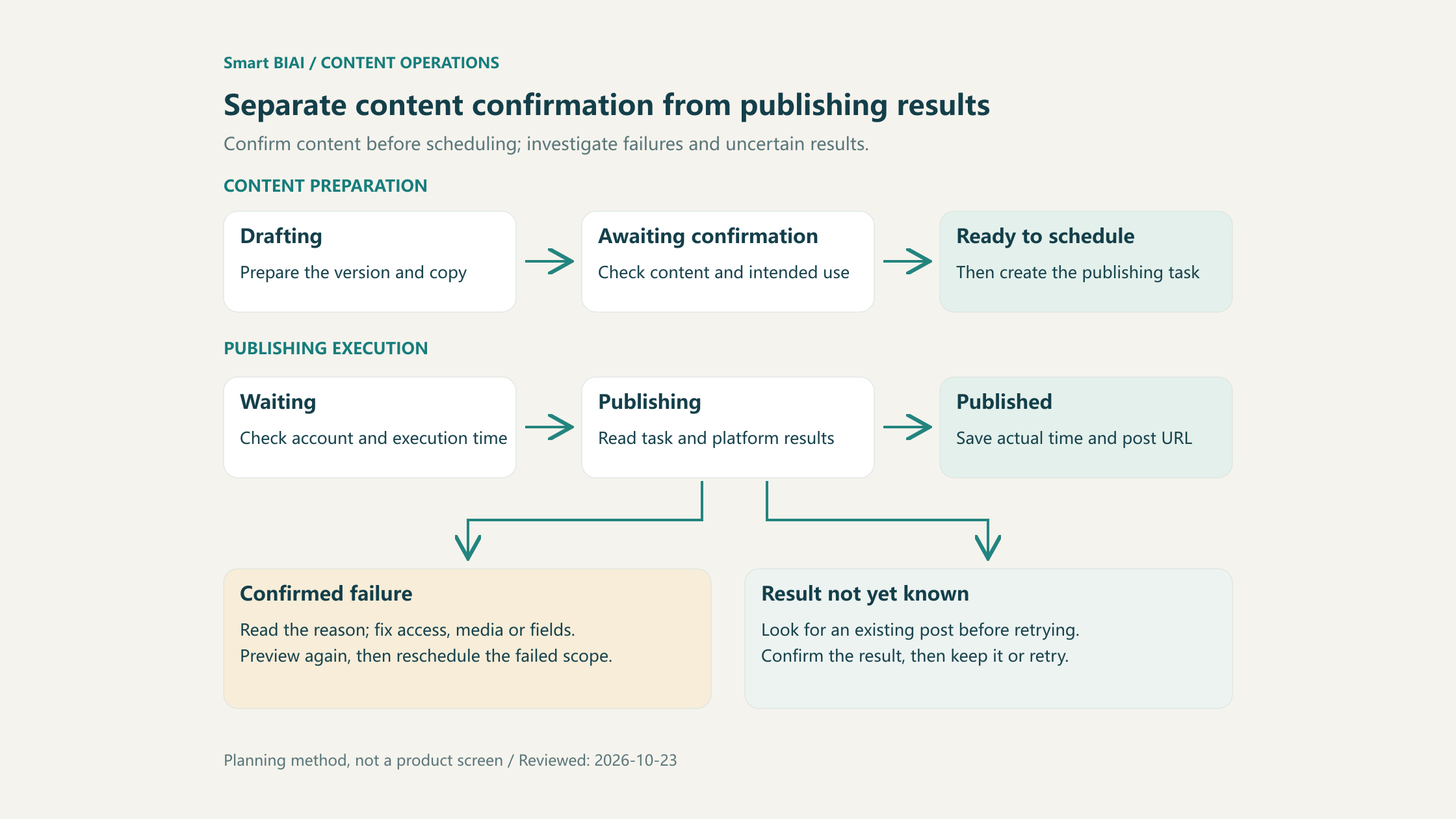
Figure 2. Confirm the content before scheduling; investigate failed and uncertain tasks before continuing.
| Situation | First action | What to retain |
|---|---|---|
| Caption or video changes after scheduling | Check the new version; update the real task or cancel and recreate it | Old and new versions, reviewer and affected tasks |
| Campaign is postponed or paused | Check both the calendar and tasks still waiting to run | New time, or the cancellation result and reason |
| A task clearly failed | Read the reason, fix authorization, media or fields, then retry only the failed tasks | Original attempt, reason and subsequent attempts |
| Request timed out and the result is unknown | Check the task and platform for an existing post before retrying | Uncertain state, query result and any existing post ID |
| A public post exists | Check its content and address | Actual publication time, post URL, task and version |
Changing a spreadsheet time does not change a task already submitted to a publishing tool. After a plan change, verify that the real task was updated or cancelled, then record the new arrangement. Keep the retry reason and result so the next person can see what has been resolved and what still needs attention.
6. What should you record after publication to plan the next week?
Record the actual post first, then add measurements for a defined observation window. The public post URL opens the result; the website tracking URL is the destination used in the post. Save both in separate fields.
| Result field | What to retain | How it supports the next round |
|---|---|---|
| Publication result | Task ID, post ID or URL, actual publication time | Identify published work and tasks needing attention |
| Content version | The file, caption and cover actually used | Find the version to revise or reuse |
| Platform metrics | Metric name, value, scope and collection time | Compare matching windows and similar content on the same platform |
| Website visits | The tracking URL actually placed and the source of visit or inquiry data | Review subsequent website activity |
| Next action | More footage, revised copy, reuse or a schedule change | Create a specific task for the following week |
Fixed observation lengths such as 24 hours or seven days after publication can make reviews easier, while each platform's metric definitions still need separate treatment. Mark missing measurements as pending or unavailable rather than zero. Retry attempts are not additional published posts.
Start the weekly review with unfinished tasks and missing media, then examine published content. Repeated audience questions can become next week's topics. Before changing the time for a weak post, check its version, language, execution result and measurement window.
7. How can Smart BIAI help execute the calendar?
Start the calendar in a spreadsheet, then use the chosen versions, accounts and times to prepare real publishing tasks. Smart BIAI's global social media operations support account and content-asset management, publishing previews, account-level time zones, task states and failure handling. A practical starting sequence is:
- Find the required language and platform version in the media library; check usage and member access.
- Select a connected target account and check its time zone and available publishing formats.
- Prepare or generate the plan, then review each post's media, local time, platform fields and AI disclosure before confirming.
- Read each task's result and add the actual time, post link and unresolved issues to the calendar.
Start with one product and a small account group, note missing media and scheduling problems, and adjust the next round. For tool operation, continue with cross-time-zone scheduling and the batch publishing workflow. Complete one publication before expanding the number of accounts and markets.
Plan the next step for your markets
Start with one product, three markets and a small set of accounts. Connect content versions, local times and publication results. If your team is coordinating several markets or account groups, discuss an enterprise plan to work through the account, media and distribution requirements.
Questions enterprise teams ask
1. Does one asset need several rows when it goes to several accounts?
Use a separate row for each planned publication on each account, linked to the shared source asset ID. This allows independent versions, times, fields and results.
2. Does a solo operator need all these fields?
Start with the version, account, local time and time zone, publishing fields, state and post link. The preparer and reviewer can be the same person. Add collaboration details as the workload grows.
3. Is the target market the same as the account's location?
Not necessarily. Keep the target market, account information and operating time zone separate. Where a country has several time zones, select the actual zone rather than recording only the country.
4. Will a fixed Beijing time keep the local publication time unchanged?
Daylight-saving changes can shift the relationship. To keep a recurring local time, convert each date using the target time zone and check the scheduler's execution-time preview.
5. What should be checked after content confirmation and before scheduling?
Check the target account, publishing version, local time, required platform fields and AI disclosure. After execution, read each task result and add the actual time and post link.
6. Can the entire batch be retried immediately after a timeout?
First query the original tasks and platform results for existing posts. Correct confirmed failures before handling that scope; keep checking uncertain results so successful content is not published twice.
7. Does editing the calendar automatically update a scheduled task?
If the calendar is not connected to the real publishing tasks, update or cancel the affected tasks in the publishing tool as well. Verify their execution times before updating the calendar.
8. Can view counts from different platforms be ranked directly?
Check platform definitions, content scope and observation length first. Trends can be reviewed across platforms, but differently defined counts should not be ranked as an identical metric.