
SHORT ANSWER
Choose an AI video tool by trying your own product materials, languages and exports. This guide offers 10 checks, a 12-version trial example and a decision table to compare revisions, teamwork and cost. Find out what to test before buying and when a video production service may better suit your team.

Article
Start by making a video from your own product materials. Then compare languages, batch work, exports, revisions, teamwork and cost. Giving each AI video tool the same tasks helps you see which one suits your regular production needs.
When producing weekly videos for several products and markets, look beyond visual quality. Consider how easily you can reuse materials, make corrections, estimate costs and hand finished files to a colleague.
1. Are you making one video or supplying content every week?
Start with a short brief: the materials you have, target markets, approximate weekly version count, people doing the work and intended use of the finished videos. That makes it easier to choose between a focused creation tool, a platform for ongoing production and a production service.
| Your main need | An approach to consider | What to test or discuss |
|---|---|---|
| An occasional creative clip made and exported by one person | A focused generation or editing tool | Output quality, ease of use, export specifications and cost per task |
| Regular marketing videos for several products and international markets | A platform that can organize materials, versions and batch tasks | Reusing inputs, matching products to languages, making revisions and handing over files |
| Creative planning and finished delivery without an in-house production team | A video production team or service | Sample style, scope, deliverables, revision arrangements and quotation |
An existing content team may need a more efficient tool. A business without production time or creative support can discuss AI video production services. Discuss the creative work, finished versions and revisions the service would include.
2. What should the 10 checks involve?
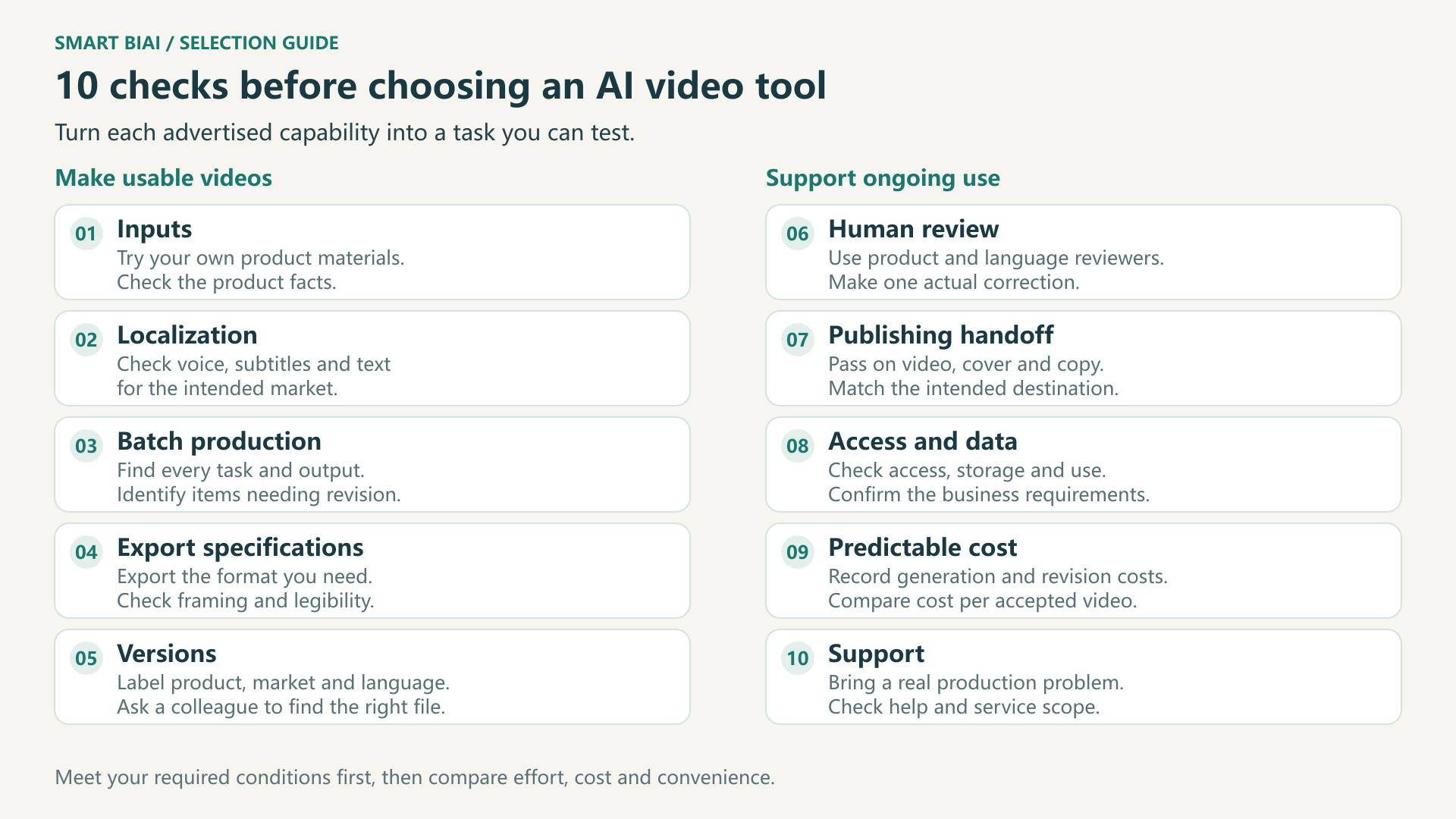
Try the features you need during an actual production task. These 10 checks suit product explainers, ecommerce short videos and international brand content. Start with the work your team does most often.
| Check | What to do during the trial | What to look for |
|---|---|---|
| 1. Inputs | Start with your own product photos, descriptive text or source footage | Whether existing materials work, without changing the product's appearance, specifications or use |
| 2. Localization | Make a version of the same content for a target language and market | Accurate, natural and consistent subtitles, voice, on-screen text and product names |
| 3. Batch production | After approving a sample, try a small set of products or creative variations | Traceable tasks and files, with completed, unsuccessful and revision-needed items identifiable |
| 4. Export specifications | Export the aspect ratio, duration and resolution needed for the intended channel | Files that fit the intended use, without cropping product details or subtitles |
| 5. Versions | Label files by product, market, language and version, then ask a colleague to find one | Correct files that are easy to locate, without confusing earlier and revised versions |
| 6. Reviewing outputs | Ask someone familiar with the product and language to watch a video, then make a correction | Accurate product information, voice, subtitles and brand presentation, with practical editing options |
| 7. Publishing handoff | Give operations the video, cover, copy and intended account details | A clear match between the file and its destination, without excessive repeated sorting |
| 8. Access and data | Let creators and operators try the tool; ask how materials are stored, used, exported and deleted | Access suited to each person's work and data handling that fits the business |
| 9. Predictable cost | Record actual generation, translation, processing and revision consumption | A budget you can estimate and the cost of each video accepted for use |
| 10. Support | Bring an actual production problem to the provider | An explanation, a practical next step and clear scope for the relevant plan or service |
If the inputs are incomplete, start with the product, brand and language preparation checklist. For a creative comparison, use creative analysis and original recreation to turn ideas about openings, selling points and shots into work suited to your own product.
3. Which trial tasks give you a useful comparison?
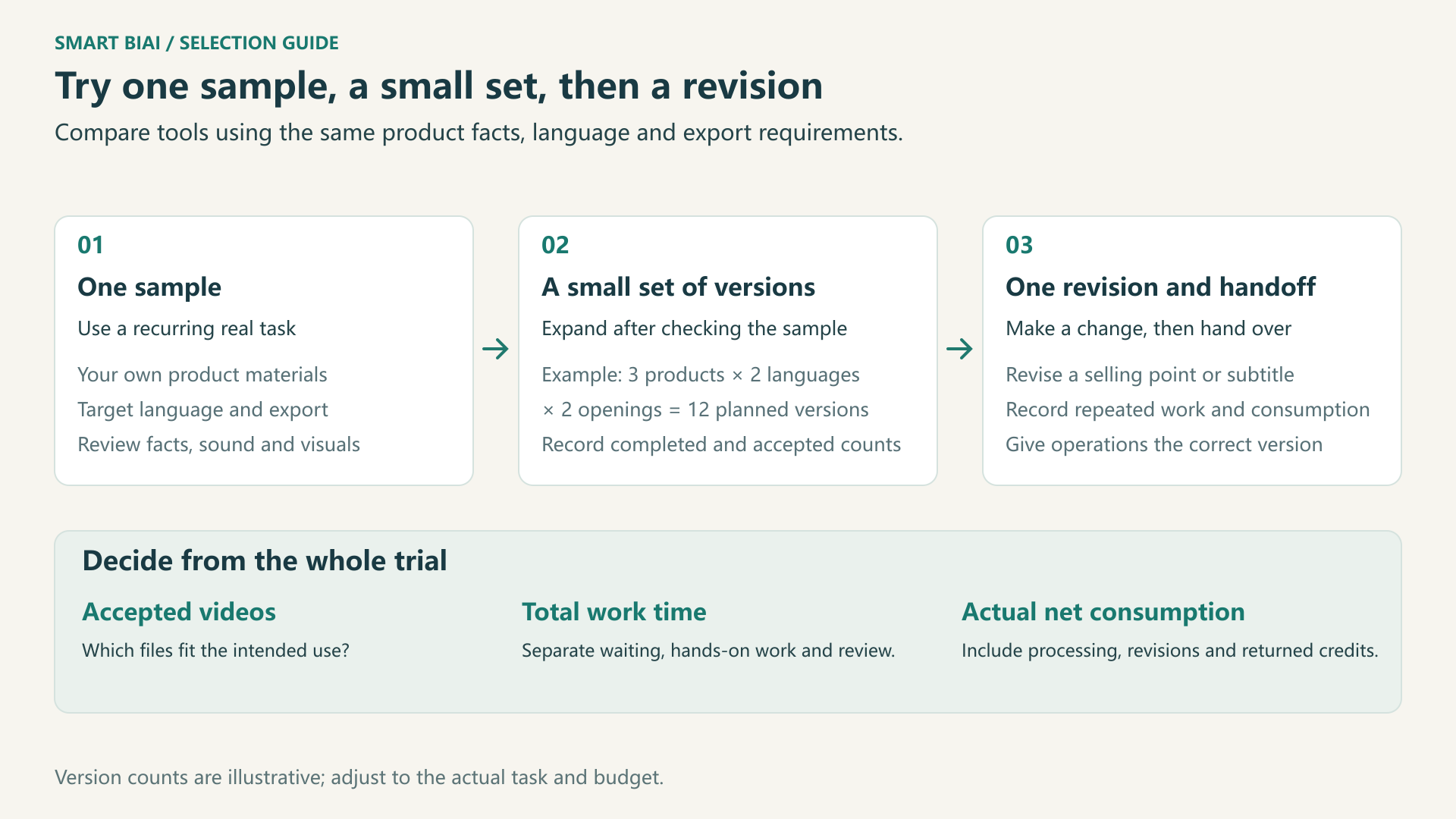
Make one video for a common use, then try a few versions and a revision. Use the same product information, target language and export requirements across tools, and note the preparation each one needs.
For example, three products, two languages and two openings make 3 × 2 × 2 = 12 versions. Start with one, then add more according to your needs and budget once you are happy with the sample.
| Trial stage | Task | Records to keep |
|---|---|---|
| One representative sample | Make a video from actual product information for the main intended use | Original materials, settings, export, elapsed time, consumption and corrections needed |
| A small set of market and creative versions | Add another language, product or opening | Planned, completed and accepted counts, with files matched to products and languages |
| One revision and handoff | Change a selling-point description or subtitle, then give the result to operations | Steps repeated, added work and consumption, and whether the colleague can take over |
An insulated water bottle explainer is one useful sample: show the appearance using your own images, describe its use in the target language, and check that capacity and heat-retention details match the product information.
To compare creative openings, extend the trial into a video creative testing matrix. Change one main factor at a time so that differences are easier to interpret.
4. What makes a tool worth buying beyond its best sample?
Check that product information, language and exported files fit the intended use. Then compare production time, revisions and cost. If an important need is still unclear, try that specific task before deciding.
| Trial outcome | What you observed | Next step |
|---|---|---|
| A good fit for continued use | Required conditions are met, common tasks work, revisions and handoff are clear, and costs are acceptable | Choose a plan or discuss an enterprise arrangement based on the next stage of production |
| More testing needed | The sample works, but another language, export, batch revision or access arrangement remains unclear | Test that specific task before expanding use |
| Not suitable for the current need | Important product facts remain wrong, exports do not fit the purpose or a material data requirement cannot be met | Compare another workflow, tool or service |
Record waiting time, hands-on work and review separately. Alongside the completed count, note how many videos are ready to use and what changes the others need. This makes regular production work easier to estimate.
The automotive video localization case and smart hardware content operations case provide context for organizing content across markets. Use your own materials and production requirements when testing fit.
5. How do you compare the cost of an accepted video?
Compare the same intended deliverable, record actual net consumption and divide by the number of videos accepted for use. Include generation, translation, brand treatment, revisions and review effort. Credit units differ between tools, so a smaller credit number does not necessarily mean a lower cost.
Credits per usable video = actual net credits consumed in the trial ÷ usable videos. To estimate a monetary budget, convert credits using the applicable plan and add staff time and other production expenses. If no video is usable yet, investigate and make corrections before calculating a cost per video.
Smart BIAI charges model generation and subsequent processing separately; combined processing adds the selected charges. Credits deducted for a failed or cancelled task are returned automatically, while retrying creates a new chargeable task. Check plans and pricing for current rates, units and trial conditions, and use the enterprise AI video cost breakdown for a fuller estimate.
6. When should Smart BIAI be on your trial list?
Consider Smart BIAI when the team needs regular marketing videos for international markets and may also need to connect that work with social account operations. AI Video Creation supports starting from product links, text, images or source videos for generation, localization and brand treatment. For account operations and publishing, the social media matrix offering is a further option to discuss.
Try a common production task and compare the results using the 10 checks. For several users, connections to other systems or specific data needs, review the data and security information and discuss those needs in an enterprise consultation.
Start with one actual production task
Use the AI Video Creation product page to enter free registration and trial access with prepared product information and a clear task. For several markets, team collaboration or system connections, request an enterprise consultation and describe your materials, expected volume and the work you want to improve.
Questions enterprise teams ask
Does a larger model list make a tool better for business?
Not necessarily. More models offer more choices. Test your own products, languages and exports to see whether the output is usable, revisions are practical and consumption is acceptable.
Do we need an enterprise platform for only a few videos a week?
Consider task complexity first. A single person making a few videos in one language may start with a focused tool. Even at low volume, several reviewers, markets or strict material requirements can justify checking collaboration and data arrangements.
How do we check product and brand consistency?
Use the same product and brand information across several versions, then review appearance, names, specifications, logos and selling points. Ask someone who knows the product to confirm the result; similar visual style alone is insufficient.
Must we make a large batch during a trial?
No. Start with one sample and add products, languages or openings once you are happy with it. Choose the trial size according to your actual tasks and available credits.
Does free trial access cover every model and processing task?
Smart BIAI Flash and Lite support free trial access; other models require payment or a package purchase. Trial tasks consume credits under the rules, and additional processing is charged separately. Check your account for available models, credits and expiry.
How should prices between AI video tools be compared?
Compare actual consumption, accepted videos and staff time for the same deliverable. Convert credits using the applicable plan and include processing and revisions. A single generation price is not the full cost of delivery.
Can operations publish a video immediately after generation?
Check product information, subtitles, sound, framing and permitted material use. Make any needed corrections, then hand over the correct version, cover and copy to operations.
When is a production service a better choice?
Discuss a service when the business lacks creative support, production time or the ability to assess finished work. An existing team handling recurring tasks may try software first. A team can also commission important campaigns while using tools for routine content.